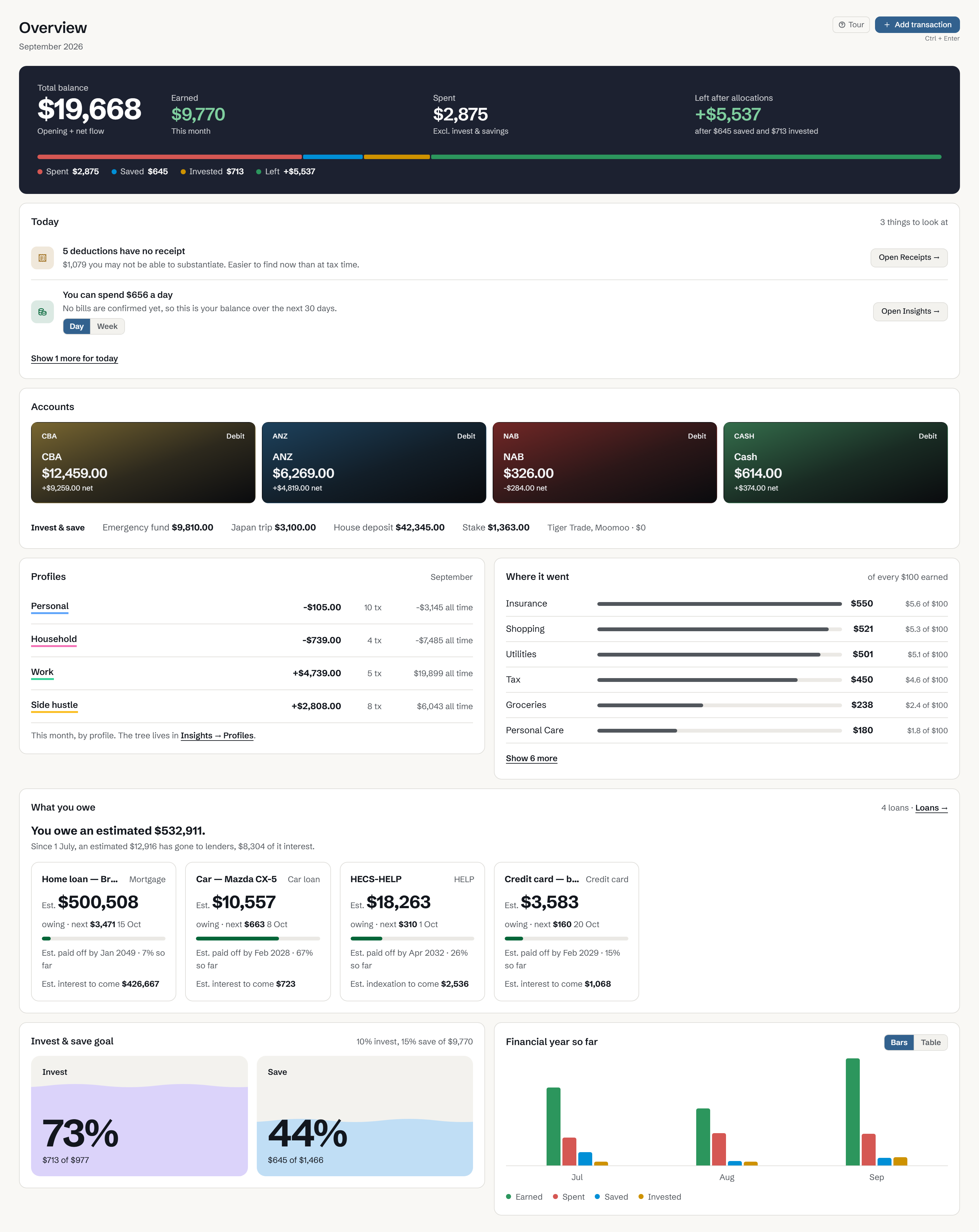
A month in Vault.
September 2026, with fictional records. See where the money went and how Vault works out each total.
Vault 0.8.4, Complete plan, Modern style. Some features need a paid plan.
What’s left this month
Start with what you earned, then take away spending, saving and investing. What remains is Left after allocations.
Acme Pty Ltd payroll $5,200 · Invoice 118 — Redgum $2,400 · Sold bike — Marketplace $420 · Invoice 119 — Redgum $1,750
The $1,120 ATO refund is recorded as Received. It’s money returned to you, so it doesn’t count towards Earned.
What needs attention
Today shows deductions still missing a receipt and how much you can spend each day, worked out from your records.
In the app, each item opens the screen where you deal with it.
Your everyday balance
Total balance adds up CBA, ANZ, NAB and Cash. Savings and investment accounts are shown separately below it.
The $600 from CBA to Emergency fund changes both balances, but Vault leaves it out of Earned and Spent.
Spending by profile and category
Profiles separate personal, household and work spending. Where it went shows how much of every $100 you earned went to each category.
When your loans could be paid off
For each loan, Vault estimates the payoff date and the interest still to come at your current repayments. Loan tracking is part of Complete.
This demo has 4 loans: Home loan, Car, HECS-HELP and Credit card.
Progress towards your goals
This demo sets aside 10% of income to invest and 15% to save. The chart beside it shows each month of the financial year.
See your own month in Vault.
Download Vault and import a CSV from your bank. The Overview fills in from your records.
The pictures are Vault running with fictional records, its date set to the end of September 2026. Nothing was edited in.